
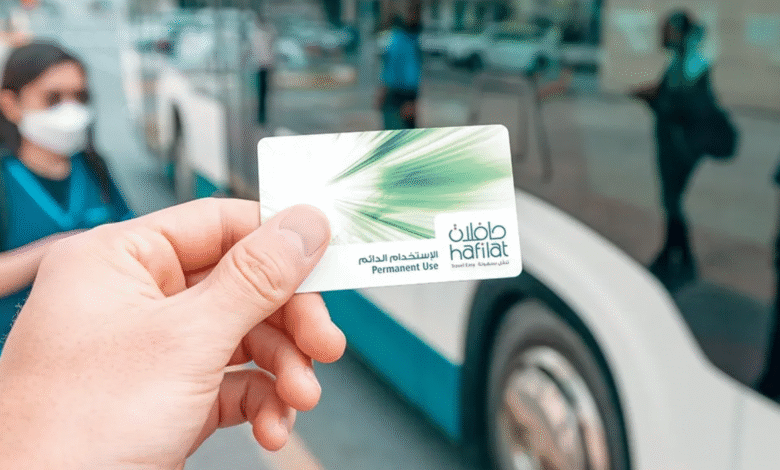
Hafilat Card Recharge is a straightforward process designed to ensure uninterrupted travel across Abu Dhabi’s public transport network. Users can top up their cards online through official platforms such as the Hafilat website or the Darbi app, using their card serial number and bank card for payment. This method offers quick, secure, and convenient access to add balance without needing to visit physical recharge points.
The maximum credit limit on a Hafilat card is AED 150, and the balance remains valid for three months from the recharge date. Travelers can activate the balance simply by using the card for transport or at designated sales and recharge machines. With multiple online options available, managing a Hafilat card balance has never been easier or more efficient.
What is Hafilat Card?
The Hafilat Card is Abu Dhabi’s smart transportation card, designed for easy payment on public buses across the city. It functions like a prepaid debit card, allowing users to pay bus fares quickly without the need for cash.
There are different types of Hafilat Cards available, including personalized cards for frequent commuters and anonymous cards for occasional travelers. Each card stores a balance that can be recharged as needed.
Using the Hafilat Card offers convenience by eliminating the need to carry cash and simplifying fare payment. It supports multiple fare options, including single rides and monthly passes.
Users can check their balance and recharge the card through various channels such as the Darbi mobile app, the official Hafilat website, and ticket vending machines located at bus stations.
Read our blog: Dubai Postal codes
The card aims to make public transportation more accessible and efficient, supporting Abu Dhabi’s goal of enhancing its urban transit system. It is essential for anyone who regularly uses the city’s bus network.
How To Recharge Hafilat Card
Recharging the Hafilat card can be done through multiple convenient channels. Users have options like online platforms, physical machines, mobile applications, and retail locations, each providing simple steps for topping up the card balance quickly and securely.
Online Recharge Methods
Users can recharge their Hafilat card via the official Hafilat website. They need to log in or register, enter the card serial number, and select the amount to recharge. Payments are made using a bank card, which is required to complete the transaction.
The maximum balance allowed on the card is AED 150, and once recharged, the balance remains valid for three months. The recharge is processed instantly, enabling immediate use for travel or purchases.
Recharge at Ticket Vending Machines
Hafilat cards can be topped up at Ticket Office Machines (TOMs) and Swift Recharge Machines (SRMs) located at bus stations. Users tap the card on the machine, select the “Recharge” option, and choose their payment method—either cash or card.
The updated balance loads immediately after payment. These machines provide a straightforward way to top up while at a bus station, with no internet needed.
Mobile App Recharge Process
The Darbi mobile app supports Hafilat card recharges. Users download the app on smartphones or tablets, sign in, and enter their card’s serial number. Payment is completed via linked bank cards or other supported electronic methods.
This method offers convenience, allowing users to recharge anytime and anywhere. The app updates the balance instantly, making it ready for immediate use.
Recharge at Retail Locations
Various retail stores and authorized outlets across Abu Dhabi support Hafilat card recharging. Users provide the card serial number and payment at the counter to add funds to their card.
Payments can be made using cash or electronic methods depending on the retailer’s facilities. This option serves those who prefer in-person transactions without using machines or online services.
Hafilat Card Recharge Options
The Hafilat card can be recharged through several convenient methods aimed at accommodating different user preferences. These options include online payments with credit or debit cards, cash payments at specific locations, and using digital wallets for fast, secure top-ups.
Credit and Debit Card Payments
Users can recharge their Hafilat cards online via the official website or the Darbi mobile app by entering their card’s serial number. This process requires a valid credit or debit card to complete the transaction.
Payments are processed securely, and the balance is credited immediately after successful authorization. The maximum balance that a card can hold is AED 150, with a validity of three months starting from the recharge date. This option is widely preferred for its convenience and ability to be completed from anywhere with internet access.
Cash Payment Options
Hafilat cardholders can top up their cards using cash at various physical locations. These include authorized sales outlets, recharge machines installed at bus stations, and some inter-city buses equipped with payment terminals near the driver.
Cash recharges allow users who prefer not to use electronic payments to maintain a balance easily. When paying by cash, users need to provide their card for recharging. The balance added follows the same AED 150 limit and validity conditions.
Using Digital Wallets
Digital wallets like Payit offer a quick and simple way to recharge the Hafilat card. By linking the card within the wallet app, users can transfer funds instantly using their smartphone.
This method provides additional convenience by integrating recharge with other payment services, allowing passengers to manage their travel balance efficiently. The process requires the serial number of the Hafilat card and supports automatic payment methods stored within the wallet app.
Checking Hafilat Card Balance
Users can quickly check their Hafilat card balance using several convenient methods. These include online access through the official website, a dedicated mobile app, and physical kiosks at key transit locations. Each method requires the card number or serial number to retrieve the current balance.
Via Official Website
To check the balance on the official website, users must:
- Visit the Hafilat portal at hafilat.darb.ae.
- After navigating to the balance check section, they enter their card number or serial number in the designated field.
- Once submitted, the website displays the current balance in AED (Dirham). ‘
- Users do not need to register or log in, although logging in with a UAE Pass is an option for easier access.
- This process also allows users to recharge their cards by selecting preset amounts (e.g., 10, 20, 50 AED) or entering a custom value.
Using the Hafilat Mobile App
The Hafilat balance can also be checked via the Darbi mobile app, compatible with smartphones and tablets.
- Users must install the app, open it, and navigate to the balance inquiry section.
- They enter the card’s serial number to view the balance instantly.
- The app offers the added convenience of mobile recharges without visiting external facilities.
It is a secure and fast option for regular travelers who want real-time updates on their card status.
At Physical Kiosks
Physical kiosks for balance checking are located at main bus terminals and transit stations across Abu Dhabi.
- Users simply tap or enter their card details into the machine interface.
- The kiosk then displays the available balance and offers options to recharge.
This method provides a direct way to verify card status without internet access. It is suitable for those who prefer in-person transactions or do not use digital platforms regularly.
Troubleshooting Recharge Issues
Recharge problems with the Hafilat card often involve errors during the transaction, delays in balance updates, or difficulty in contacting support for assistance. Knowing how to handle these issues can prevent extended inconvenience and ensure uninterrupted use of public transport.
Common Transaction Errors
Errors during recharge transactions commonly arise from incorrect card details, insufficient funds, or network disruptions. Users should verify the card serial number and ensure there are enough funds in the payment method before attempting to recharge.
If the payment fails, refreshing the page or restarting the app may help. Using official platforms like the Hafilat website or authorized top-up machines reduces the risk of errors. Users should avoid multiple rapid attempts to prevent duplicate charges or temporary account locks.
Delayed Balance Updates
Sometimes, the Hafilat card balance does not update immediately after a recharge. This delay can occur due to system processing times or temporary connectivity issues.
To resolve this, the user should wait at least 10 to 15 minutes before checking again. Tapping the card on a designated top-up or payment machine can also trigger the balance update. If delays persist beyond this time, it may indicate a technical issue requiring further investigation.
Customer Support for Hafilat Card Recharge Problems
For unresolved recharge problems, contacting Hafilat customer support is essential. Users should prepare their card serial number and valid email address for verification purposes.
Support can be reached through the official Hafilat website’s contact link or by visiting participating service centers. Clear communication of the issue and transaction details speeds up resolution. In cases of lost passwords or account access problems, customer support provides specific recovery steps.
Tips for Efficient Hafilat Card Usage
Efficient use of the Hafilat card involves timely recharging and understanding card benefits. Proper planning helps avoid disruptions, while maximizing benefits ensures better value for regular commuters.
Planning Recharge in Advance
Recharging the Hafilat card before the balance runs low prevents travel interruptions. The card has a maximum balance limit of AED 150 and a validity of 3 months after each recharge, so users should monitor usage accordingly.
The minimum top-up amount is AED 10, and recharges can be done online or at physical recharge points. Users should avoid last-minute recharges, as some online platforms may experience temporary delays. Activating the balance by tapping the card on travel or recharge machines before expiry prevents loss of credit.
Scheduling regular top-ups aligned with travel frequency ensures smooth, uninterrupted access to public transport services.
Maximizing Card Benefits
Using a Personalized Hafilat card offers benefits like discounted fares and access to special offers for frequent travelers. This card type is more suitable for residents who rely on public transport daily.
Linking the Hafilat card with mobile wallets, such as Payit, enables easy balance checking and recharging on the go. This convenience supports efficient travel planning and quick response to low balance alerts.
Cardholders should also take advantage of promotions and fare caps when available, which reduce overall commuting costs. Regular users benefit most by combining these features while maintaining an active, sufficiently funded card.


